Tune in to watch the live broadcast on Twitch and earn 10th Anniversary Twitch Drops as Pokémon GO celebrates its milestone 10th anniversary. Trainers can get a massive bundle of in-game rewards just by tuning in.
You can watch the live broadcast on Thursday, July 9, 2026, between 6:15 p.m. and 9:30 p.m. EDT on the Official Pokémon GO Twitch Channel. You will need to watch the stream continuously for at least 30 minutes to be able to receive the 10th Anniversary Twitch Drops.
It is important you keep the stream active and in focus. Minimizing the window or muting the player can sometimes pause your Twitch Drop progress timer.
Before You Start: 10th Anniversary Twitch Drops Checklist
To ensure your viewing time counts toward your rewards, make sure you meet these quick requirements:
An Active Twitch Account: You must be logged into the Twitch account you plan to link.
A Pokémon Trainer Central (PTC) Account: Ensure you know your login credentials, as this is required to bridge your game data with Twitch.
Watch via Desktop Browser or Official App: Twitch Drops tracking can sometimes glitch on third-party smart TV apps or console browsers. For the safest results, use a PC browser or the official Twitch mobile app.
10th Anniversary Twitch Drops Rewards
Watching for 30 minutes unlocks a code for a variety of useful items such as
- 10 Poké Balls
- 10 Great Balls
- 10 Ultra Balls
- 10 Potions
- 10 Hyper Potions
- 10 Max Potions
- 10 Revives
- 10 Max Revives
- 10 Rare Candies
- 10 Rare Candy XLs
- 10 Lucky Eggs
How to Claim Your 10th Anniversary Twitch Drops
- Connect Your Accounts: Link your Pokémon Trainer Central account to Twitch.
- Watch the Stream: Tune into the broadcast on July 9 for at least 30 minutes.
- Claim on Twitch: Watch for a pop-up notification in the chat once you hit the 30-minute mark, or claim it directly via your Twitch Drops Inventory.
- Grab Your Code: Head to the Pokémon Rewards Inventory Page, find your drop, and click “Show Code.”
- Redeem: Copy the code and paste it into the Niantic Offer Redemption page to send the items straight to your in-game bag.
Make sure to claim and redeem your code quickly, as these anniversary drops are only available for a limited time.
Linking your Pokémon GO Trainer Central account with your Twitch Account.
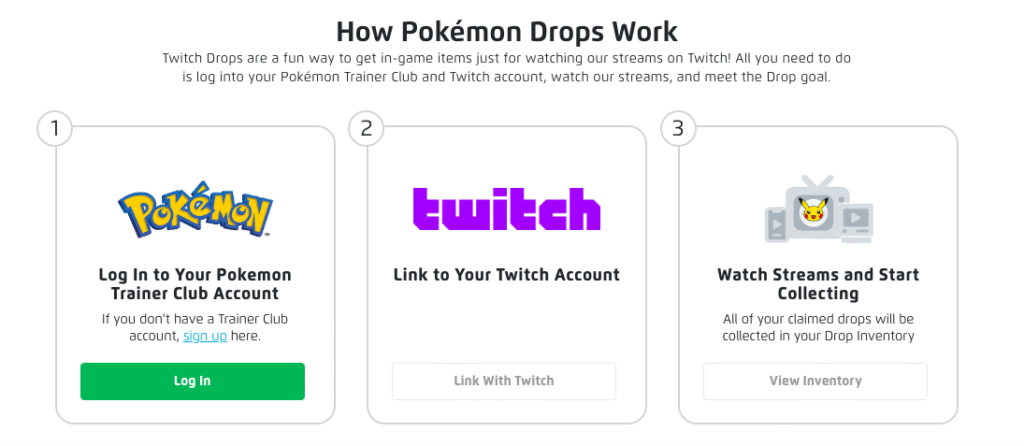
Here is a step-by-step guide to link your accounts.
- Go to rewards.pokemon.com to start linking your accounts and then managing your Twitch Drops.
- As seen in the image above, click on the “log in” button to log into your Pokémon Trainer Central (PTC) account. Enter your correct PTC username and password. If successful, you will be taken to a Twitch authorization page.
- Authorize the Twitch connection. You will need to authorize by linking your PTC with your Twitch Account here. Click on the “Link with Twitch” button and you will be directed to Twitch’s login page.
- Log into your Twitch account with your correct username and password. Authorize Twitch to link your accounts.
- If successful, you will be redirected back to rewards.pokemon.com and get a confirmation indicating your accounts are successfully linked. If not, please refresh the page.
Claiming your Rewards after watching Pokémon GO Twitch stream
First, you need to follow (or subscribe) to the Pokémon GO Twitch channel. You will get notified when a stream is on. However, sometimes you may not get the notification. Therefore, it is important to pay attention to Pokémon GO in-game news. You will know when it’s time to earn rewards by watching the Pokémon GO Twitch stream.
Watch for the required time. Ensure you keep the stream window active and unmuted. Twitch will monitor your time and when you watch for the required time, you will get a Twitch notification above the stream window. If you missed it, you can visit your Twitch Drops Inventory to confirm your reward.
Step 1: Copy Your Code from the Inventory
Head back to the Pokémon Rewards Page.
Log in using your linked PTC account.
Click View Inventory to locate the claimed 10th Anniversary Drop.
Click Show Code and copy the alphanumeric sequence to your clipboard.
Step 2: Redeem the Code Online
Visit the official Niantic Offer Redemption Page.
Log in using the exact same credentials (Google, Facebook, or PTC) that you use to access your main Pokémon GO account.
Paste your copied code into the text box and click Apply.
Open your Pokémon GO app; a confirmation pop-up will appear, and the items will be added directly to your Item Bag.
What to Do If Your 10th Anniversary Twitch Drops Progress Stops
If you’ve been watching for a while and notice your Twitch Drop progress bar isn’t moving, try these quick fixes:
Do Not Fully Mute the Stream: Turning off the volume completely via the Twitch player can signal to the platform that you are “inactive.” Instead, mute the tab in your browser or keep the volume very low.
Check Your Status: Ensure your Twitch profile status is set to “Online.” If you are set to “Invisible,” your watch time might not be recorded.
Disable Ad Blockers: Some aggressive ad-blocking browser extensions interfere with Twitch’s tracking scripts. Temporarily disable them for the official channel.
Refresh the Inventory Page: If you hit 100% progress but don’t see the notification, manually refresh your Twitch Drops Inventory page to force the “Claim” button to appear.
This is how you earn rewards by watching Pokémon GO streams on Twitch. You will be able access to exclusive Timed Research that you will need to complete within the specified number of days.