You can now earn points by watching Pokémon GO Championships on Twitch. The Championships (Regional, International, and Worlds) are streamed on Twitch.tv. Trainers can watch the battles to learn how to play the GO Battle League. In addition, you can receive interactive overlays based on your watch time.
Pokémon Championships Overlay
In addition to getting Twitch Drops during some of the Championships, you can also check-in to the Pokémon Championships Overlay and earn points for every Regional, International, and Worlds Championships event you watch on Twitch.tv on your Desktop computer or Laptop.
The overlay is a Twitch extension designed specifically for Pokémon competitive viewing. It features the following.
- Interactive Overlays
- Real-time Match Data
- Bracket Viewing
How to Earn Points by watching Pokémon GO Championships
During a Regional, International, or Worlds Championships, you can use the integrated Twitch extensions to earn points when watching.
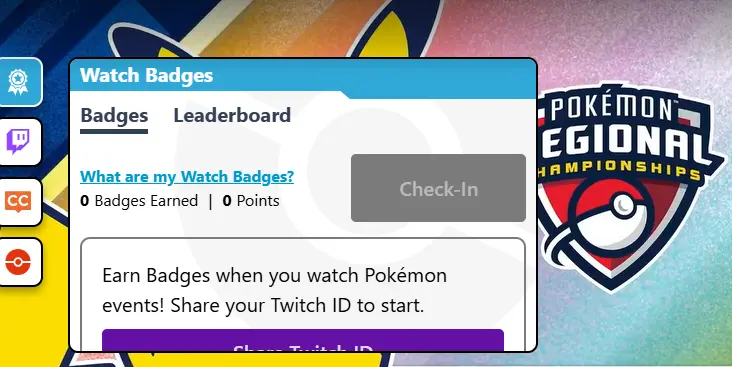
- Go to Pokémon GO’s Twitch Channel, log into your Twitch account, and hover over the video player. Click the ‘badge’ button on the left side of the window to open the “Watch Badge” card.
- If this is your first time, you will need to click on the “Share Twitch ID” button before you can click the “Check-in” button.
- If you have already shared your Twitch ID, you can go ahead by clicking on the “Check-in” button.
- Once you do, your watch time will start.
Please note that this only works during the livestreams of any of the Pokémon GO Championships on Twitch.
Your watch time will earn you virtual watch badges during streams where there are no Twitch drops. During the events with Twitch Drops (i.e., codes you can use to claim items or research in Pokémon GO), you can use the watch badge to monitor your watch time.
After watching the stream for the required duration (usually 30–45 minutes), click “Claim Reward” to retrieve your unique code or link it to your game inventory.
Is your Twitch Account Linked to your Pokémon GO account?
If not, please follow the following steps. Your Pokémon GO account needs to be linked before you earn badges or Twitch Drops.
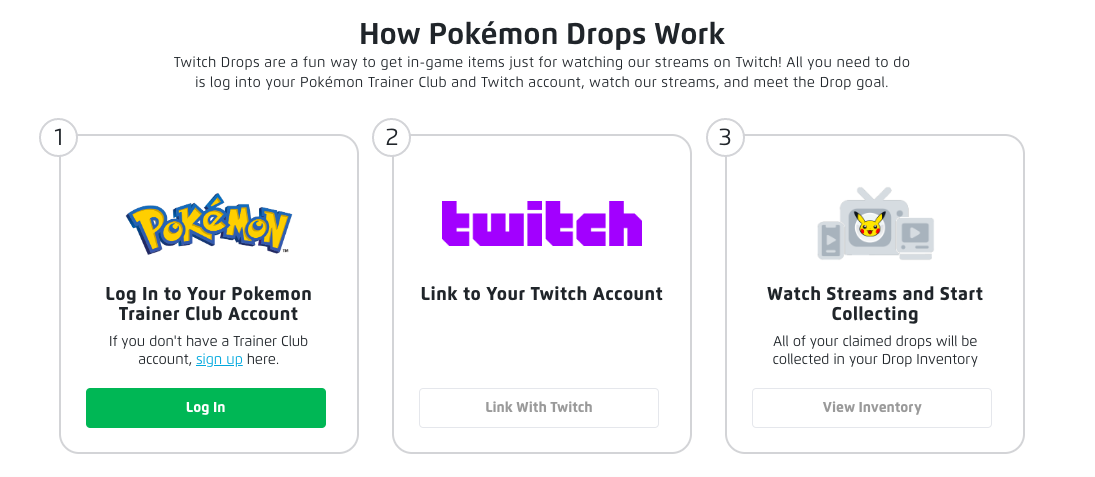
- Go to rewards.pokemon.com to start linking your accounts and then managing your Twitch Drops.
- As seen in the image above, click on the “log in” button to log into your Pokémon Trainer Club (PTC) account. Enter your correct PTC username and password. If successful, you will be taken to a Twitch authorization page.
- Authorize the Twitch connection. You will need to authorize by linking your PTC with your Twitch Account here. Click on the “Link with Twitch” button, and you will be directed to Twitch’s login page.
- Log into your Twitch account with your correct username and password. Authorize Twitch to link your accounts.
- If successful, you will be redirected back to rewards.pokemon.com and get a confirmation indicating your accounts are successfully linked. If not, please refresh the page.
Enjoy!