You can earn Chicago Twitch Drops by watching the Pokémon GO Fest 2026: Chicago live on Pokémon GO’s Twitch Channel. Tune in and watch for at least 45 minutes on Sunday, June 7, 2026, between 10:00 a.m. and 5:00 p.m CDT (Central Daylight Time) to earn Twitch Drops.
Pokémon GO Fest 2026: Chicago Twitch Drops
You will receive a code after watching for 45 minutes uninterrupted. The code, when redeemed, will grant you a Timed Research. The Timed Research rewards the following after completion.
- 1 Star Piece
- 1 Lucky Egg
- 50 Poké Balls
- 50 Great Balls
- 50 Ultra Balls
- 1 Rare Candy XL
- 1 Incense
READ ALSO: Watch Pokémon GO Twitch Stream to Earn Rewards
Earning Twitch Drops by watching Pokémon GO Twitch Stream
The first thing you need to do is connect your Pokémon Trainer Central account to Twitch. This is the step that unlocks exclusive rewards just by watching the official Pokémon GO streams on Twitch.
After watching for the specified minutes, you will be able to claim codes that grant you special Timed Research. Completing the special Timed Research leads to encounters with different rewards depending on the event happening when you claimed the codes.
To get started, you need the following.
- A Pokémon GO Trainer Central account. If you don’t have one already, you can create one via Pokémon.com
- A Twitch Account. If you don’t have one already, you can create one via Twitch.tv
- Link your Pokémon GO Trainer Central account with your Twitch Account.
Linking your Pokémon GO Trainer Central account with your Twitch Account.
Twitch Drops are a fun way to get in-game items just for watching Pokémon GO streams on Twitch.
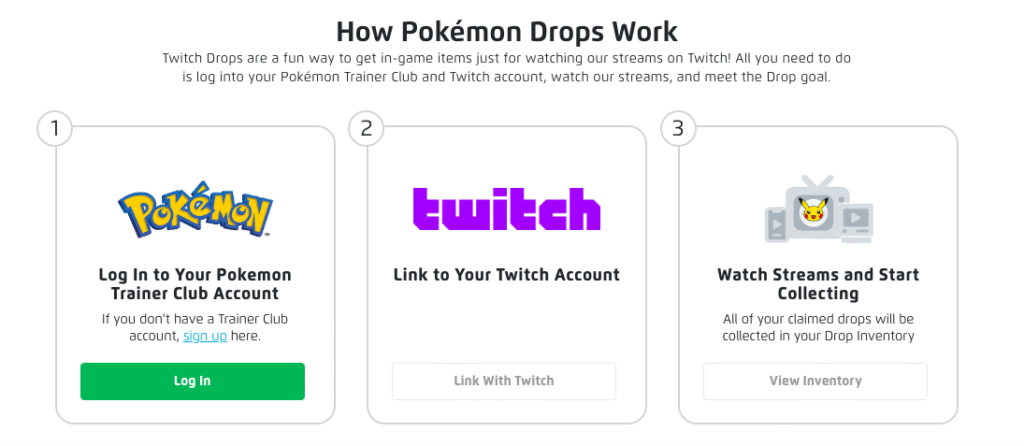
Here is a step-by-step guide to linking your accounts.
- Go to rewards.pokemon.com to start linking your accounts and then managing your Twitch Drops.
- As seen in the image above, click on the “log in” button to log into your Pokémon Trainer Central (PTC) account. Enter your correct PTC username and password. If successful, you will be taken to a Twitch authorization page.
- Authorize the Twitch connection. You will need to authorize by linking your PTC with your Twitch Account here. Click on the “Link with Twitch” button, and you will be directed to Twitch’s login page.
- Log into your Twitch account with your correct username and password. Authorize Twitch to link your accounts.
- If successful, you will be redirected back to rewards.pokemon.com and get a confirmation indicating your accounts are successfully linked. If not, please refresh the page.
Claiming your Rewards after watching Pokémon GO Twitch stream
First, you need to follow (or subscribe) to the Pokémon GO Twitch channel. You will get notified when a stream is on. However, sometimes you may not get the notification. Therefore, it is important to pay attention to Pokémon GO in-game news. You will know when it’s time to earn rewards by watching the Pokémon GO Twitch stream.
Watch for the required time. Ensure you keep the stream window active and unmuted. Twitch will monitor your time and when you watch for the required time, you will get a Twitch notification above the stream window. If you missed it, you can visit your Twitch Drops Inventory to confirm your reward.
Claim your reward
Now, go back to rewards.pokemon.com and log in with your linked PTC account. Once logged in, click the “View Inventory” button to find the Drop you claimed on Twitch. Click the “Show Code” button and copy the code.
Claim the code
Go to the Pokémon GO Store’s offer redemption page and log in using your usual method of logging into the store. Paste the code into the redemption box and click on “APPLY”. The reward you claimed will then appear in your Pokémon GO app.
This is how you earn rewards by watching Pokémon GO streams on Twitch. You will be able access to exclusive Timed Research that you will need to complete within the specified number of days.