The Pokémon GO Explorer Gadget is getting an update! This is in line with continuity in reshaping how Trainers interact with the world around them. In the latest announcement from the Pokémon GO team, a major overhaul to the Explorer Gadget has been revealed.
The transition from a background-only tool to an interactive, real-time gameplay companion marks one of the most significant quality-of-life updates Scopely Explore has introduced this year.
If you missed the release details, you can check the Pokémon GO Explorer Gadget for more information.
Whether you are a casual daily player or a hardcore Trainer, here is the complete, detailed breakdown of the update to the Explorer Gadget.
Active Play Integration
Historically, the Gadget functioned purely as a background utility—automatically attempting to catch wild Pokémon and spin nearby PokéStops while the Pokémon GO application was not actively open on your mobile device.
With this latest update, the Explorer Gadget evolves into a real-time partner while you actively play:
Active Gameplay Assistance: The Explorer Gadget now actively assists you even when the app is open on your screen, allowing for dual automation and manual play simultaneously.
Level Requirement & Activation: Available to Trainers at Level 20 and higher, the gadget can be activated by tapping the gadget’s icon in the top right of your Map View or by selecting it directly from the Key Items section of your Item Bag.
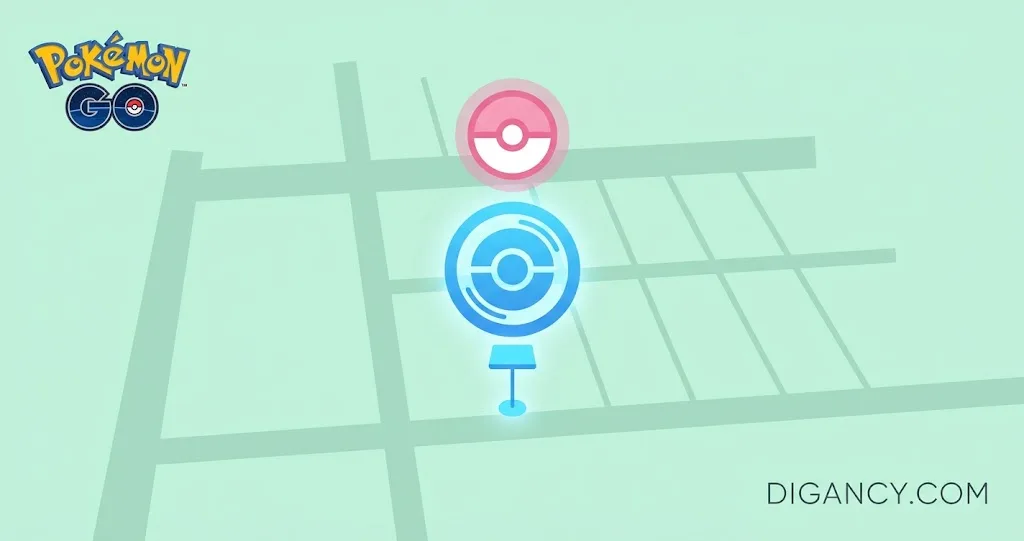
The Pink Poké Ball Visual Indicator: While exploring with the gadget turned on, a distinct pink Poké Ball icon will appear floating directly over any Pokémon or PokéStops that the gadget is currently targeting to catch or spin.
Manual Override Feature: Seeing a target selected by the gadget gives you instant choice. Trainers have a limited window of time to manually tap on the highlighted Pokémon or PokéStops to override the Gadget and attempt the catch or spin themselves.
Comprehensive Summary Logs: At any point, you can review an itemized summary showing which Pokémon were caught by the Explorer Gadget and how many PokéStops were spun simply by selecting the gadget’s icon from your Map View or Item Bag.
Key Usage and Limitations
Pokémon GO Plus + Compatibility: You do not need to unpair accessory devices like the Pokémon GO Plus + to use the Explorer Gadget. However, note that the Explorer Gadget and a paired physical accessory device cannot be active simultaneously.
Targeting Exceptions: The Explorer Gadget will automatically bypass certain high-value encounters. It will not attempt to catch Pokémon that are not yet registered in your Pokédex or designated “mighty Pokémon,” giving you full control over rare and new additions to your collection.
Tips for Maximizing the Explorer Gadget
To get the absolute most out of the updated Explorer Gadget during your daily play sessions, consider the following strategy tips:
Battery and Data Management: While active play assistance runs smoothly, continuous real-time catching can increase battery consumption. Keep a portable power bank handy during Community Days or major events.
Prioritize Manual Catching for Rarities: Because the gadget intelligently bypasses unregistered Pokédex entries and “mighty Pokémon,” always keep an eye out for the pink Poké Ball indicator so you don’t miss out on high-priority manual catches.
Clearing Inventory Space: Since the gadget automatically spins PokéStops, make sure you routinely manage your Item Bag space so you don’t miss out on valuable items like Max Potions, Ultra Balls, or Evolution items.
The November 2026 update to the Explorer Gadget successfully bridges the gap between passive utility andcan to manage manual overrides, filter high-priority catches, and leverage on-screen guidance without sacrificing accessory compatibility.
Equip your gear, keep an eye out for those pink Poké Ball indicators, and happy exploring!
For official event announcements and updates, check out the Pokémon GO official website.
Manage your personalized search experience:
Add this site to your Google Search Preferences list