The upcoming Pokémon Night Out event is an in-person/local event at the Intuit Dome in Los Angeles, USA, on October 24, 2026. However, all Pokémon GO Trainers around the world still have a fantastic opportunity to join in on the celebration and get some unique in-game digital gear.
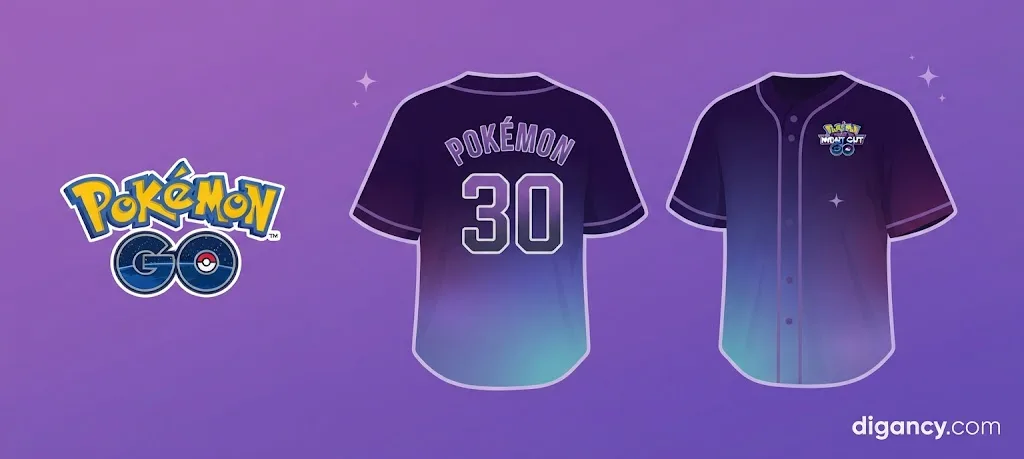
To mark the occasion, Scopely Explore and The Pokémon Company are offering an exclusive Twitch Drops campaign. By tuning into the official broadcast, you can unlock a special code for Timed Research that awards your avatar an exclusive Pokémon Night Out baseball jersey!
What Rewards Are Included in the Pokémon Night Out Timed Research?
While the main attraction for digital attendees is the sleek, custom Pokémon Night Out baseball jersey for your avatar, completing the event’s exclusive Timed Research typically yields additional helpful items. Trainers who tune into the stream and redeem their code can expect standard progression boosts, such as Stardust, XP, and encounters with event-themed Pokémon. Make sure to claim and finish your research tasks before they expire!
What is the Pokémon Night Out Event?
The Pokémon Night Out event brings community members together for an unforgettable in-person celebration at the state-of-the-art Intuit Dome in Los Angeles, CA, on October 24, 2026. However, recognizing that millions of Trainers worldwide want to participate in the excitement, the team is broadcasting the festivities live so that the global community can feel included right from home.
By taking part in the digital viewing party via Twitch, you can earn exclusive in-game content that highlights the event, most notably the custom baseball jersey designed specifically for this celebration.
Step-by-Step Guide: How to Obtain and Redeem Your Twitch Drop Code
Claiming your exclusive Timed Research code is straightforward, but it requires linking a few accounts and tuning into the stream at the right time. Follow these detailed steps to ensure you successfully grab your gear:
1. Follow the Official Pokémon Twitch Channel
First, head over to the official Pokémon Twitch Channel and make sure you hit the follow button. Following the channel ensures you will receive a handy notification right when the live broadcast starts, so you won’t miss a minute of the action.
2. Connect Your Accounts
To track your progress and receive rewards, you need to connect your Pokémon Trainer Central account to Twitch. Follow the steps in Watch Pokémon GO Twitch Stream to Earn Rewards to successfully link your Twitch profile.
3. Tune into the Livestream
Mark your calendar for Saturday, October 24, 2026, starting at 7:30 p.m. PDT. You will need to watch the Pokémon GO Twitch livestream for a cumulative total of at least 30 minutes.
Important Note: Keep your browser window active! Minimizing the stream or running it in a completely hidden background state will pause your Twitch Drop progress timer on Twitch.
4. Claim Your Twitch Drop
Once you have successfully watched the livestream for 30 minutes, a pop-up window will appear right in the Twitch chat prompting you to claim your drop. Alternatively, you can navigate directly to your Twitch Drops Inventory Page to claim it manually.
5. Find Your Unique Code
After you click “Claim” on Twitch, head over to rewards.pokemon.com and select View Inventory. Locate your specific drop and click Show Code. Keep in mind that Trainers can only claim this Timed Research code once per account.
6. Redeem Your Code in Pokémon GO
Copy the revealed code to your clipboard. From there, open the official Offer Redemption Page to input your code and send the rewards straight to your game account. If you encounter any issues during this final stage, check out the official Code Redemption Support Article for step-by-step troubleshooting assistance.
Troubleshooting Your Pokémon Night Out Twitch Drops
If you are having trouble receiving your rewards, try these quick troubleshooting tips:
Progress Bar Stuck? Ensure that your Twitch tab is active and unmuted. Minimizing the browser or hiding the window in the background can sometimes pause your drop progress.
Account Unlinked: Double-check that your correct Pokémon Trainer Club account is actively synced with your Twitch profile.
Code Not Showing? Give it a few minutes after claiming the drop on Twitch, then refresh your inventory page on rewards.pokemon.com.